Quick Start 가이드
https://james.apache.org/server/quick-start.html
Apache James Project – Apache James Server 3 - Quick Start
Quick Start The goal of the document is to allow anyone to start with James binary Spring distribution as an operational mail server. For more complete ways of deploying James server please refer to the James installation guide Step 0: Requirements #######
james.apache.org
Step 0: Requirements
Step 0: Requirements
####################
* JDK 11
* root (linux/unix) or Administrator (Windows)
* libc6 (linux)
* 512MB RAM (launches with -Xmx512M - can use less, can need more, depending on load)
Step 0-1: JDK 11 설치
$ sudo apt-get update
$ sudo apt-get install openjdk-11-jdk
$ sudo apt-get install openjdk-11-jre
$ which javac
-> /usr/bin/javac
$ readlink -f /usr/bin/javac
-> /usr/lib/jvm/java-11-openjdk-amd64/bin/javac
$ vi /etc/environment
-> JAVA_HOME="/usr/lib/jvm/java-11-openjdk-amd64"
$ source /etc/environment
Step 0-1: libc6 설치
$ sudo apt-get install libc6-i386 libc6-dev-i386
Step 1: Download
Step 1: Download
#################
* Download apache-james-3.3.0-app.zip from http://james.apache.org/download.cgi#Apache_James_Server
https://james.apache.org/download.cgi#Apache_James_Server
Apache James Project – Download
Downloading Use the links below to download the product from one of our mirrors. You must verify the integrity of the downloaded files using signatures KEYS downloaded from our main distribution directory. (*) James maven repositories can be found on http
james.apache.org
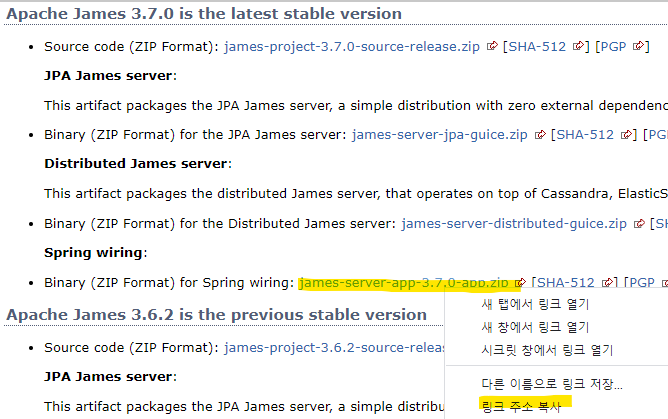
$ wget https://www.apache.org/dyn/closer.lua/james/server/3.7.0/james-server-app-3.7.0-app.zip
Step 2: Deploy
Step 2: Deploy
##############
* Unzip apache-james-3.3.0-app.zip.
* You should have a folder with sub-folders bin, conf, lib, log, var and four text files.
$ unzip apache-james-3.3.0-app.zip
$ cd apache-james-3.3.0-app
$ ls (linux) / dir (windows)
bin
BUILD.txt
conf
lib
LICENSE.txt
log
NOTICE.txt
README.txt
var
$ unzip james-server-app-3.7.0-app
Step 3: Understand James Features
Step 3: Understand James Features
#################################
Persistence
- Mailbox is for users' Inbox, Sent Items, Trash... folders - Mailbox persistence is configured in spring-beans.xml (by default jpa, you set the database connection properties in database.properties). We think to move this config out-of spring-beans.xml.
- Mailrepositorystore is for spam, error,... mails, so nothing to do with users visible mails. Available mailstore persistence are defined in mailstore.xml. Each has an URL prefix (file, db, dbfile,...) that can be used in mailetcontainer.xml to define where to store spam,... mails (exemple: file://var/mail/error/).
- Domain persistence is configured in domainlist.xml
- Users persistence is configured in usersrepository.xml
- All database connection use the database.properties in case of database access.
Mailet Container - http://james.apache.org/server/feature-mailetcontainer.html
SMTP Hooks - http://james.apache.org/server/feature-smtp-hooks.html
Step 4: Configure
Step 4: Configure
#################
* All configuration files are embedded in jars.
* We ship in the conf folder the configuration files.
* You can override the default configuration by editing these files
database.properties
META-INF/persistence.xml
dnsservice.xml
domainlist.xml
fetchmail.xml
imapserver.xml
james-listmanager.xml
jmx.properties
lmtpserver.xml
log4j.properties
mailetcontainer.xml
mailbox.xml
mailserver.xml
mailrepositorystore.xml
pop3server.xml
recipientrewritetable.xml
smtpserver.xml
sqlResources.xml
usersrepository.xml
wrapper.xml
lib folder (for your additional jar, e.g. JDBC drviers,...)
James is packaged with virtual hosting enabled, JPA (Derby database) storage for the mails, users, and domains.
On SMTP (see smtpserver.xml config)
* authRequired is true by default, so you can safely deploy James on the Internet (it won't be an open relay).
* verifyIdentity is true by default (you can only send mails with a FROM being the authenticated user).
To use another database:
* Edit the database.properties and change the values according to your database.
* Add the needed JDBC driver jar in the ./conf/lib folder according to your database.
dnsservice.xml
domainlist.xml
fetchmail.xml
imapserver.xml
indexer.xml
james-database.properties
jetm-monitoring.xml
jmx.properties
lmtpserver.xml
log4j2.xml
mailbox.xml
mailetcontainer.xml
mailrepositorystore.xml
managesieveserver.xml
pop3server.xml
quota.xml
recipientrewritetable.xml
setenv.sh
sieverepository.xml
smtpserver.xml
sqlResources.xml
usersrepository.xml
wrapper.conf
Step 5: Start
Step 5: Start
#############
$ cd bin
$ ./james start
* !! you need libc6 installed on Linux !! - sudo apt-get install libc6-i386 libc6-dev-i386 on ubuntu
* You can see log result in the log/wrapper.log file.
/james/james-server-spring-app-3.7.0/bin$ ./james start
Step 6: Create Domains and Users
Step 6: Create Domains and Users
################################
Time to add domains and users.
We will show how to via the james-cli (client interface).
You also can achieve this via JMX (launch jconsole). JMX has more operations than james-cli.
* cd bin
* james-cli -h localhost -p 9999 adddomain mydomain.tld
* james-cli -h localhost -p 9999 adduser myuser@mydomain.tld mypassword
* The username to use in your mail client will be myuser@mydomain.tld
Step 7: Test
Step 7: Test
############
$ telnet 127.0.0.1 25
Trying 127.0.0.1...
Connected to localhost.
Escape character is '^]'.
220 172.16.1.131 SMTP Server (JAMES SMTP Server 3.0.0) ready Wed, 20 Jul 2017 17:31:33 +0100 (CET)
ehlo test
250-172.16.1.131 Hello test (aoscommunity.com [127.0.0.1])
250-PIPELINING
250-ENHANCEDSTATUSCODES
250 8BITMIME
mail from:<YOUR_NAME@YOUR_DOMAIN>
250 2.1.0 Sender <YOUR_NAME@YOUR_DOMAIN> OK
rcpt to:<YOUR_NAME@YOUR_DOMAIN>
250 2.1.5 Recipient <YOUR_NAME@YOUR_DOMAIN> OK
data
354 Ok Send data ending with <CRLF>.<CRLF>
subject: test
this is a test
.
250 2.6.0 Message received
quit
Connection closed by foreign host.
Step 8: Manage
Step 8: Manage
##############
8.1. Manage via james-cli
usage: java org.apache.james.cli.ServerCmd --host <arg> <command>
-h,--host </arg> node hostname or ip address
-p,--port </arg> remote jmx agent port number
Available commands:
adduser </username> </password>
removeuser </username>
listusers
adddomain </domainname>
removedomain </domainname>
listdomains
8.2. Manage via JMX
* Launch jconsole (or any other JMX client) and connect on URL=service:jmx:rmi:///jndi/rmi://localhost:9999/jmxrmi
* Select the MBeans tab and open the org.apache.james node to view attributes and execute operations.
Step 9: Monitor
Step 9: Monitor
###############
* Monitor the ./log/wrapper.log log file.
* Monitor via JMX (launch any JMX client and connect to URL=service:jmx:rmi:///jndi/rmi://localhost:9999/jmxrmi)
* Check ./var folder usage
mail
+-error
+-address-error
+-relay-denied
+-spam
store
+-derby
+-jackrabbit
+-activemq
+-brokers
+-james
+-blob-transfer
+-outgoing
+-spool
* Check /tmp folder usage
'기타' 카테고리의 다른 글
| DNS 레코드 종류 (0) | 2022.03.27 |
|---|---|
| Docker 쌩초보 가이드 (0) | 2022.03.13 |
| [Ubuntu] Docker 설치, 제거, 세팅 (0) | 2022.03.12 |
| [Ubuntu] netstat, ssh, root password 등 초기 설정 (0) | 2022.03.12 |
| 톰캣 SSL 보안 인증서 갱신 가이드 (0) | 2021.10.23 |